

How to Create a Tree Service Estimate Calculator in WordPress
A tree service estimate calculator for WordPress collects information about the requested work, trees, property, access, nearby hazards, cleanup, and stump needs, applies company-defined pricing rules, and sends an organized request for professional review.
A useful estimator can ask whether the customer needs pruning, removal, stump grinding, storm cleanup, cabling, plant-health care, or an assessment; how many trees are involved; approximate height and trunk diameter; location; access; and proximity to buildings, fences, roads, pools, slopes, and utility lines. It can show preliminary guidance while reserving inspection, risk assessment, crew and equipment planning, permits, availability, and final pricing for the tree service company.
Collect Tree and Property Details
Apply Tree Service Price Factors
Show Preliminary Guidance
Capture Better Tree Service Leads

What Is a Tree Service Estimate Calculator for WordPress?
A tree service estimate calculator for WordPress is an interactive lead tool that asks tree-work-specific questions and applies pricing logic configured by the tree company. It can display a preliminary range and store the complete request for professional review.
The calculator can separate pruning, removal, stump grinding, storm cleanup, fallen-tree work, cabling, plant-health services, lot clearing, and commercial requests. Each path can ask relevant questions about tree count, size, condition, targets, access, cleanup, and equipment needs.
The estimator cannot inspect structural stability, identify every defect or species, determine safe rigging, evaluate energized utility hazards, or replace a qualified on-site assessment. Explore the service-business calculator hub and the WordPress estimate calculator plugin guide for the broader strategy.
Tree Service Questions to Include in the Calculator
Begin by asking what work is requested and how many trees are involved. Collect approximate height, trunk diameter, species if known, visible condition, whether a tree is standing or fallen, and whether branches hang over roofs, fences, roads, pools, neighboring property, or other targets.
Ask about gates, slopes, soft ground, backyard access, crane or bucket-truck access, parking, utility lines, debris hauling, wood stacking, stump grinding, desired timing, and property authorization. Always provide “not sure” choices. Visitors should never be encouraged to approach unstable trees, suspended limbs, storm damage, or trees touching utility lines.
Tree Service Factors That Can Change Preliminary Pricing
Tree-service pricing can depend on work type, tree quantity and size, species, condition, location, rigging complexity, targets below the canopy, access, terrain, crew size, climbing, crane or lift requirements, traffic control, hauling, disposal, stump dimensions, travel, permits, and emergency timing.
The company should configure adjustments from its own production data and service policies. Use preliminary ranges when an inspection is needed and explain that final scope and pricing depend on site conditions, safe work planning, equipment availability, and applicable rules.
Use Clear Required-Answer Validation
Optional Tree and Property Photos
Tree-Service-Specific Customer Wording
Create Separate Flows for Different Tree Work
Place It on the Correct Tree Service Page
Review Every Request Before Final Pricing
Connect the Calculator to Helpful Tree Service Content
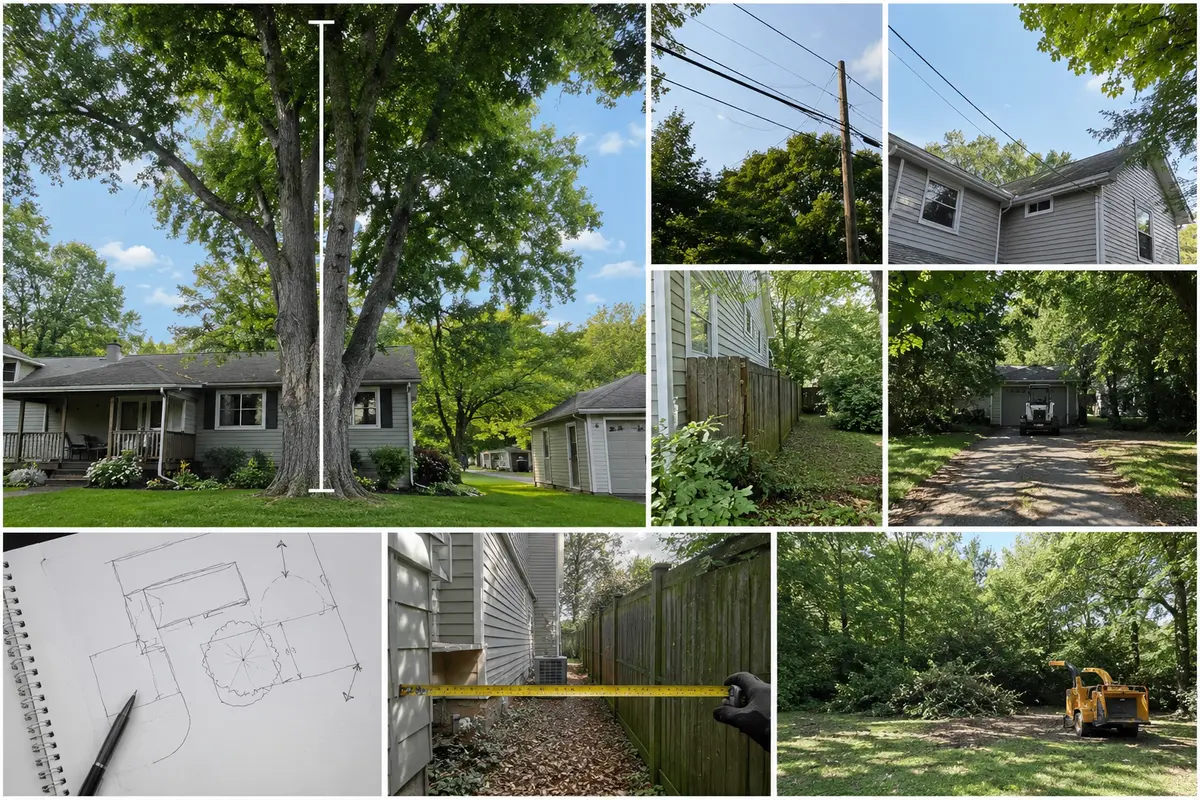
Example Tree Service Estimate Calculator Workflow
A removal flow might ask how many trees are involved, whether each tree is standing or fallen, approximate height and trunk diameter, visible dead or broken sections, proximity to a house or utility line, backyard access, gate width, slope, cleanup preference, and stump-grinding needs.
Sample tree-removal configuration: begin with the company’s minimum service charge, then apply tree-company-controlled rules for tree quantity, approximate height and trunk diameter, standing versus fallen condition, rigging complexity, crane or lift requirements, gate width, backyard access, slope, traffic control, debris hauling, wood stacking, stump diameter, travel, and emergency scheduling. Any answer involving utility contact, an unstable tree, suspended limbs, or an immediate threat should stop normal pricing and display urgent safety instructions. The tree company—not the plugin—supplies and maintains every rate, service limit, and safety rule.
A pruning flow can ask the pruning goal, affected limbs, clearance from roofs or roads, tree quantity and size, access, debris removal, and desired timing.
The visitor receives preliminary guidance, enters contact information, and submits notes and safe photos. The company reviews the site and inspects when needed before confirming the work plan, safety controls, schedule, and final price.
Example customer disclaimer: “This preliminary range is based only on submitted information. It cannot determine tree stability, internal decay, utility hazards, safe rigging, crane setup, traffic controls, permits, weather, or final pricing. Keep away from unstable trees and utility lines and obtain qualified professional review.”
How to Build the Tree Service Calculator Step by Step
List the questions your team asks during the first call. Separate pruning, removal, stump grinding, storm work, plant health, and lot clearing; arrange questions from simple to specific; include “not sure”; and require only essential information. Add verified pricing logic and test every branch.
Use Preliminary Ranges Instead of Guaranteed Prices
Tree height alone may not reveal condition, targets, access, rigging, equipment, cleanup, permits, or stump work. Present an honest range until the property is reviewed, and clearly explain what the preliminary amount includes.
Collect Useful Details Without Making the Form Too Long
Ask service type, tree count, size, location, access, and nearby hazards first. Conditional logic prevents a stump-grinding customer from answering canopy-pruning questions. Use short choices plus a notes field and safe photo option for unusual conditions.
Test Every Tree Service Estimator Path
Test every answer path, required field, pricing adjustment, emergency warning, photo upload, notification, button, disclaimer, and confirmation screen. Check mobile and desktop layouts and confirm floating actions do not cover links or form controls.
Why a Tree Service Calculator Can Beat a Basic Contact Form
A generic form may collect only a name and “remove my tree.” A tree service calculator can organize work type, tree count and size, condition, access, targets, utilities, cleanup, stump needs, photos, and preliminary pricing before the first callback. Compare an estimate calculator with a contact form and review the online estimate form guide.
What a Tree Service Calculator Cannot Determine Online
An online calculator cannot inspect internal decay, root stability, hanging limbs, soil conditions, utility voltage, safe climbing or rigging points, crane setup, traffic controls, property boundaries, permit requirements, or weather. Those decisions require qualified professional review and sometimes an on-site inspection.
Common mistakes to avoid: pricing only by height, treating standing and fallen trees alike, ignoring targets and access, hiding cleanup and stump charges, allowing normal pricing for urgent utility hazards, promising a final total, and encouraging unsafe customer photographs. Review calculator rules whenever labor, insurance, equipment, crane, hauling, disposal, fuel, permit, or emergency-response costs change.
Last reviewed August 19, 2026. This guide is educational and should be adapted to the tree company’s qualifications, services, operating area, pricing, equipment, insurance, and safety procedures.
Explore Related WordPress Estimate Calculator Pages
Continue through the service-business estimate calculator hub or compare related examples for landscaping companies, roofing companies, fence contractors, gutter cleaners, and general contractors. For safe tree, access, and storm-damage photos, review the WordPress photo-quote form guide. You can also review EstimateFlow Pro features, try the live demo, and view pricing.
Build a Tree Service Estimate Flow for Your WordPress Website
EstimateFlow Pro lets tree service companies create work-specific questions, apply their own pricing adjustments, display preliminary ranges, collect contact details and optional photos, and review every request before approving scope and scheduling.